The goal was to enhance the Twitter application by identifying user behaviors, pain points, and needs, ensuring a more seamless and user-friendly experience
I’m passionate about equipping creators with no-code web design tools, turning digital visions into reality swiftly and efficiently
Let’s get acquainted with Twitter first.
What is Twitter? Twitter is an online social networking and microblogging service that allows its users to send and read text-based messages. Until now, there are 19.5 million Twitter users in Indonesia. (Kominfo, 2022)
Why Twitter?
The thing that prompted me to re-design Twitter because of the unrest as a user since 2014, the anxiety I experienced was that some parts of the Twitter application were still not used efficiently, so it was necessary to add supporting features such as the reply and delete messages feature (for all) indirect messages and search fields in bookmarks. From the anxiety I experienced, the question, “Is anyone else experiencing the same thing?”
Goals
The goals of this user research are to find out user behavior, pain points, and user needs for the Twitter application.
Impact
I want to try to give if this design is implemented is that it will be easier and more comfortable for users to use the Twitter application, and also, users can feel helped by the new features obtained from this case study.
Design Thinking
To conduct this research, I followed the design thinking framework, which involves several key stages:
Empathize: Understanding user behavior, needs, and pain points through interviews, surveys, or observations to gather valuable insights.
Define: Analyzing the data collected to pinpoint the core problems and creating a clear problem statement to address.
Ideate: Brainstorming creative solutions to the defined problems, exploring innovative ideas that cater to user needs.
Prototype: Developing low-fidelity or high-fidelity prototypes to visualize and test the proposed solutions.
Test: Evaluating the prototypes with users to gather feedback and iteratively refine the designs for optimal results."
Tools 🧰
Google Form
Notion
Figma
Zoom & Google Meet
Time Schedule ⌛
25 April — 13 Mei 2022
Empathize ✨
At the Empathize stage, it is carried out to be able to provide appropriate and good solutions and build an understanding of the problem by researching to find out the habits, needs, and difficulties experienced by users.
Step by Step Research
Make a research plan
Quantitative research — User Screener Survey
Qualitative research — Interview and Usability testing
Collect data finding
Clustering data to determine problem statements
Participants Criteria
Man / Woman
Twitter application user at least 6 months
18–45 years old
Methods
User screening survey
Interview
Usability Testing (Remote Moderated)
Screening Survey
In this case, the use of a screening survey using Google Forms is used to get pain points or any difficulties experienced by the user. This is useful for the continuation of usability testing.
Screening Survey Results
10/26
Users experience problems with Direct Messages due to inadequate features, and users want additional features to make their activities easier.
6/26
Users have problems with Bookmarks and want a search field feature on bookmarks to make it easier to search for saved tweets.
3/26
Users are having problems saving tweets in bookmarks, and want the convenience to save bookmarks
Interview User
After conducting a screening survey, I also conducted user interviews to be able to validate further and find out in detail the user’s needs and problems.
List Questions
Background Interview
Can you introduce yourself? (name, age, current occupation)
How long have you been using the Twitter app?
In its use, you often use Twitter for what?
How do you feel when you use the Twitter app?
Why do you prefer to use Twitter over other applications?
Open-Ended Interview
While using Twitter, how was your experience in trying the features of Twitter?
While using Twitter, how was your experience in using the DM feature? Have you ever had a problem? If you are hopeful, can you tell me?
While using Bookmarks, how was your experience? Have you ever had problems? Can you tell?
So what do you think is the solution you want to the problems that have occurred?
User Interview Conclusion
Difficult to find bookmark feature
Some users feel confused, especially when saving tweets to bookmarks
Lack of features in DM (Direct Message) which causes user inconvenience (unsend, vn, reply chat)
Usability Testing
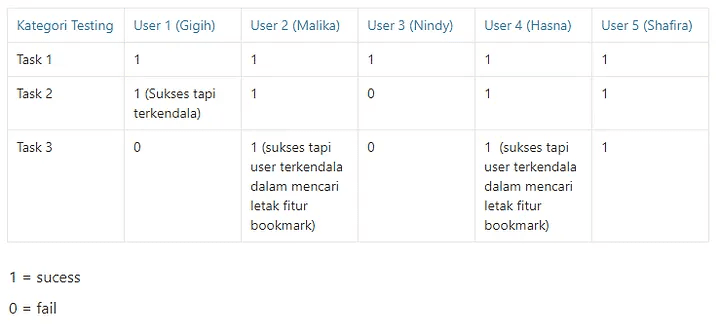
After conducting a screening survey and interview, now is the time to do usability testing.
Research Goals
Find out usability issues to access features in the Twitter app
Find out usability issues in the DM feature
Find out usability issues in the bookmark feature
Schedule
30–32 March 2022
Remote moderated usability testing
5 Twitter users
Intro Interview
Hello!
I am introducing Clarisa Yovanda Priliana, and I will be the facilitator for today’s testing session. Before we get started, I have some information for you, and I’ll be going through it to make sure no information is missed. Today I want to invite you to try some of the features in the Twitter application. I mean the features in the registration process, the Twitter DM feature, and the Bookmark feature, and do it according to the instructions given later to see if it works. As expected. This session will last about 15 to 30 minutes. I want to emphasize that we want to test this product, not to test you, so there is no need to worry about making mistakes. Please do it as normal/natural as possible when trying the product. When you use this application, say as much as possible what is on your mind and things that make you confused, don’t worry about offending me or anyone here. Your criticism and suggestions can be very constructive for the Twitter application in the future.
Are you ready? If you already allow me to record sound and screen
(starts recording)
UT Task
#Task 1: Send a message according to the instructions that have been given
Users send messages to each other to the account provided by the moderator
Users are required to try all the features in DM
#Task 2: Save Tweets in bookmarks (Timeline)
Users must save about > seven existing tweets into bookmarks
#Task 3: Find and explore bookmarks that have been stored for a long time
User opens Bookmark
The user searches for one of the tweets that have been saved in the Bookmark according to the request.
Use all the features in the bookmarks.
Closing
Okay, thank you again for taking the time to take this test. If that’s enough from me, do you have anything to ask?
If that’s the case, I will close this session. Thank you, and see you soon!
Usability Testing Result
Define
After getting insight, after that it will be defined for the results of the documentation from empathize, using several methods
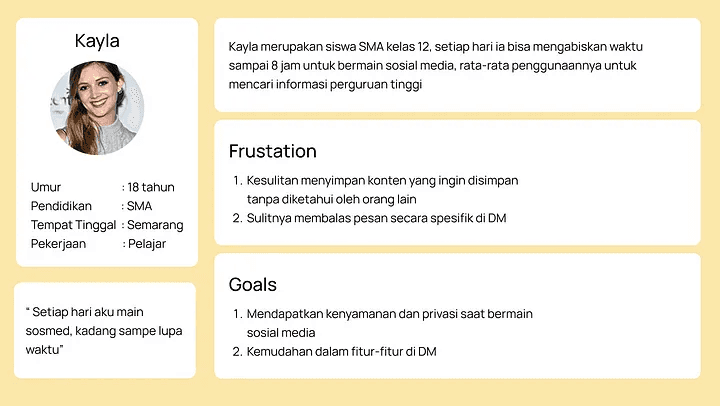
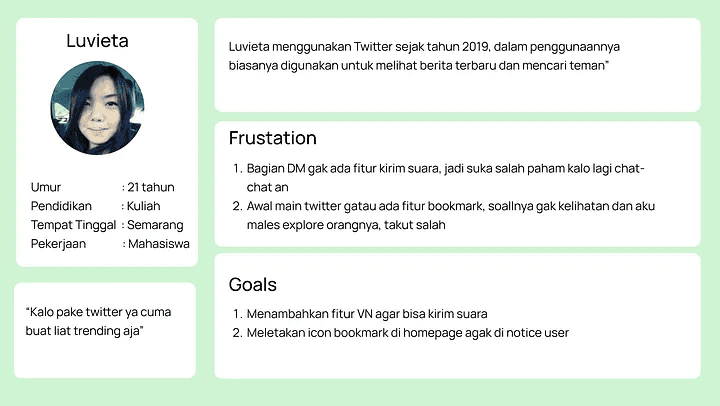
User Persona
Based on the user’s pain point, a user persona will be created to make it easier to visualize
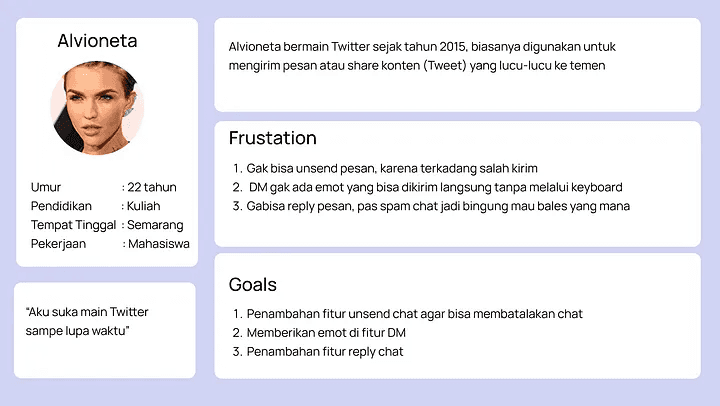
After compiling a user persona, a user journey map will be compiled, which is used to document the user’s feelings when performing tasks during usability testing.
Ideate
in the ideate stage, we will give solutions based on the user’s painting point.
The first thing to do is compile How Might We 💡. HMW will provide any solutions that will be offered to solve user problems
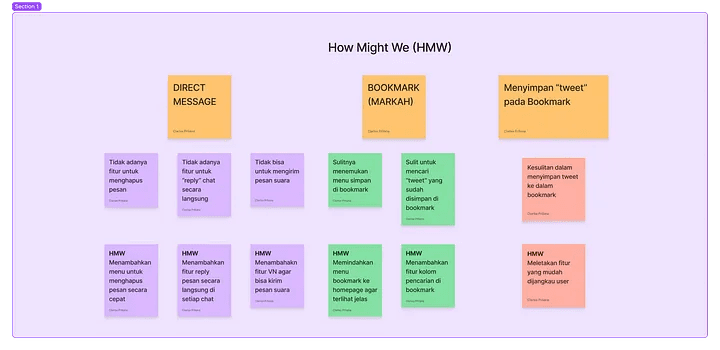
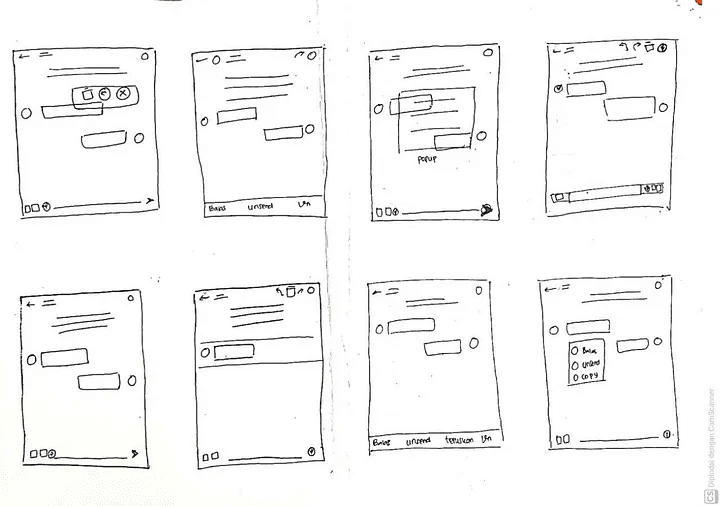
After offering a solution to the user, it will be made Crazy 8’s Making Crazy 8’s is to offer 8 design offers that will be selected according to user needs.
Crazy 8’s — Save Bookmark
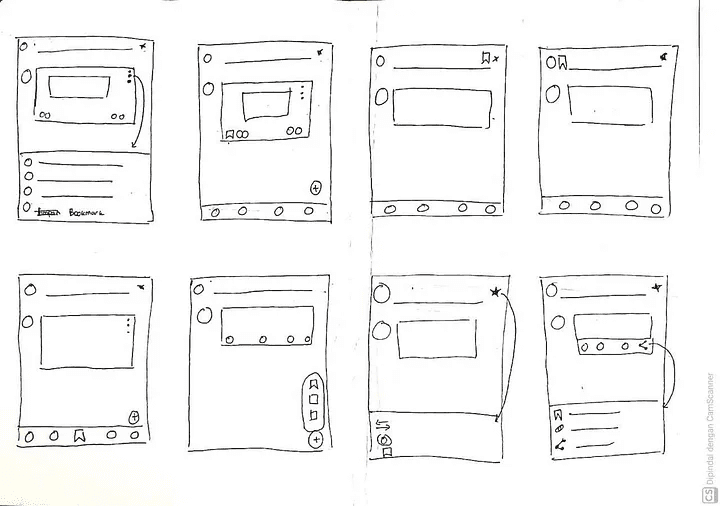
2. Crazy 8’s — Bookmark
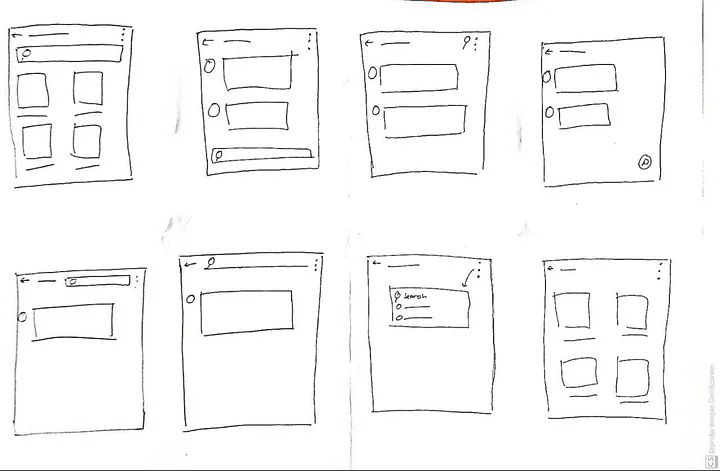
3. Crazy 8’s — Direct Message
Task Flow
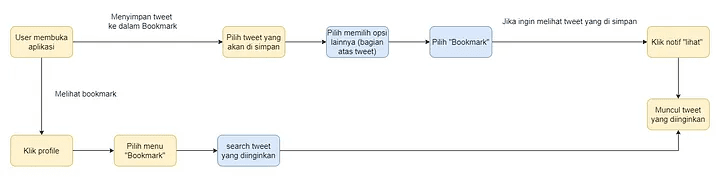
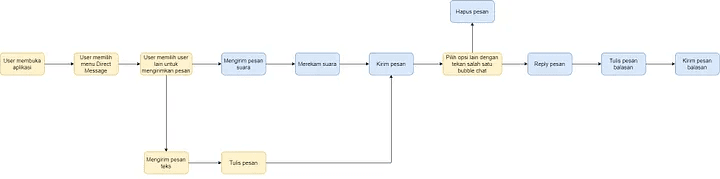
This is agreed to show the progress that exists in a simple design.
Task Flow — Bookmark
Task Flow — Direct Message
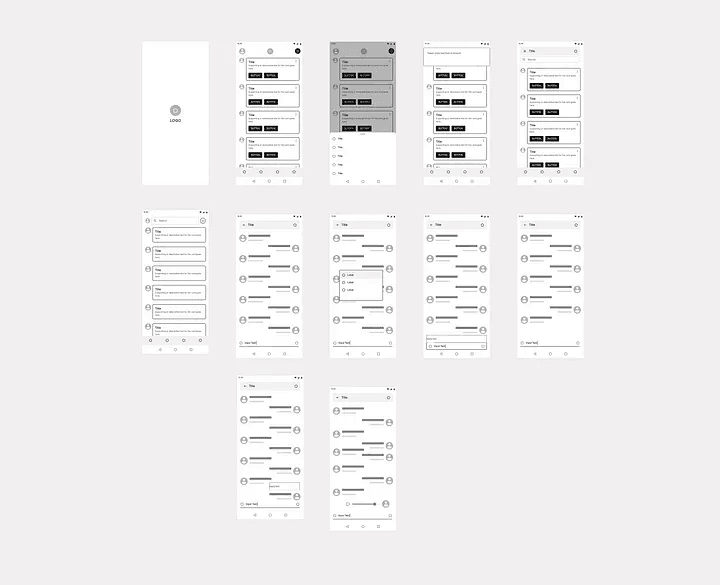
Wireframe
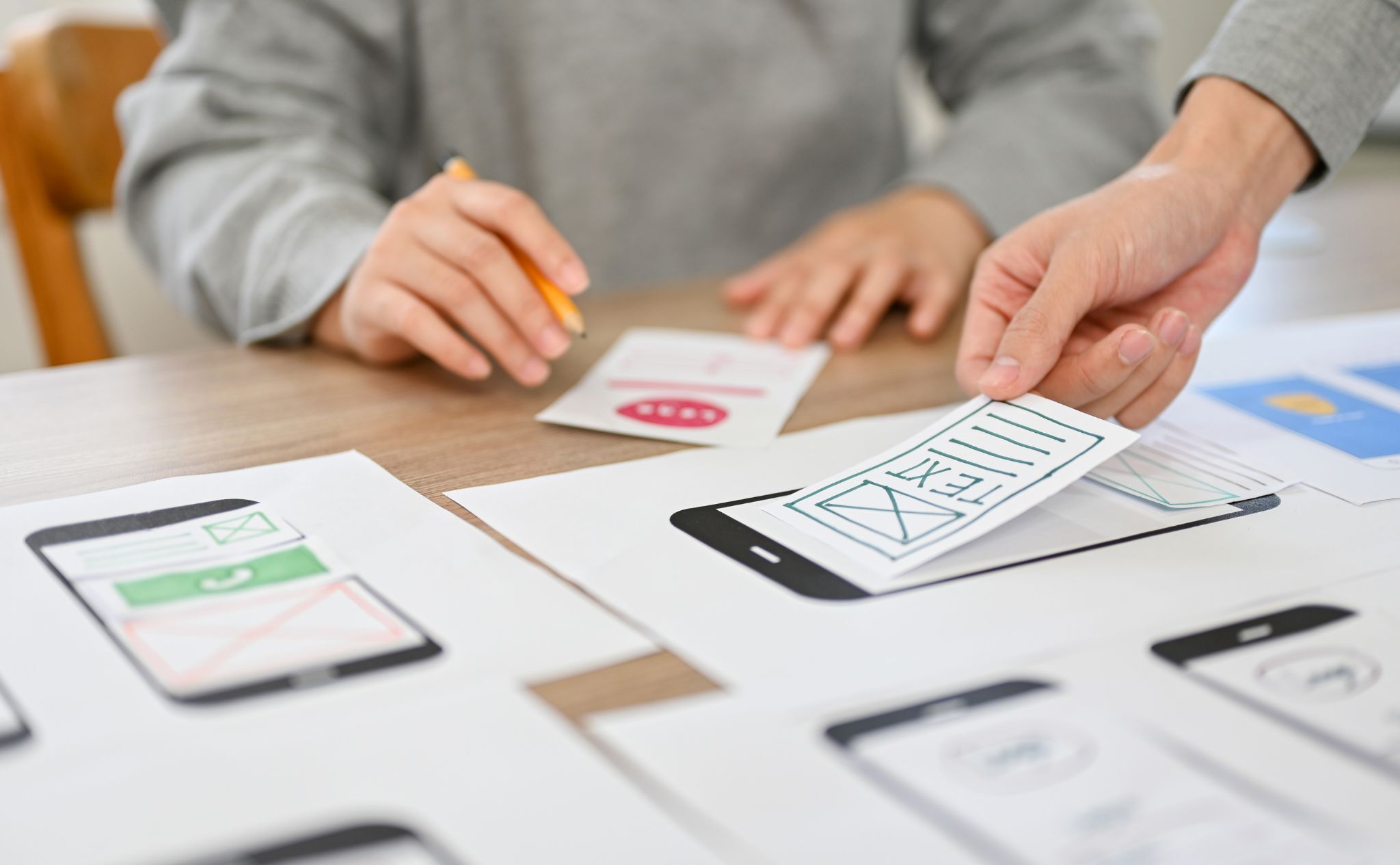
Low-fidelity wireframe to compile a rough idea of the designs to be made before becoming a high-fidelity design
Prototype 🔮
After considering some wireframes from the exploration results, I began to implement wireframes into hi-fi designs.
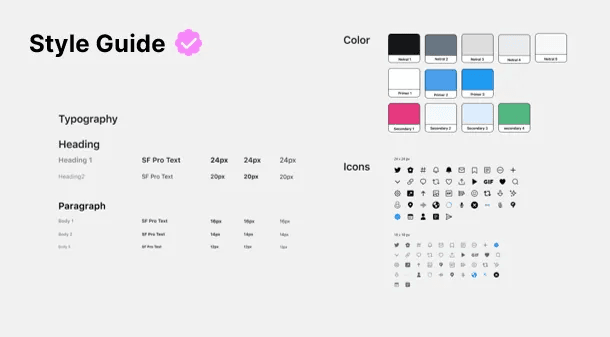
Style Guide
Ready to Show 🚀
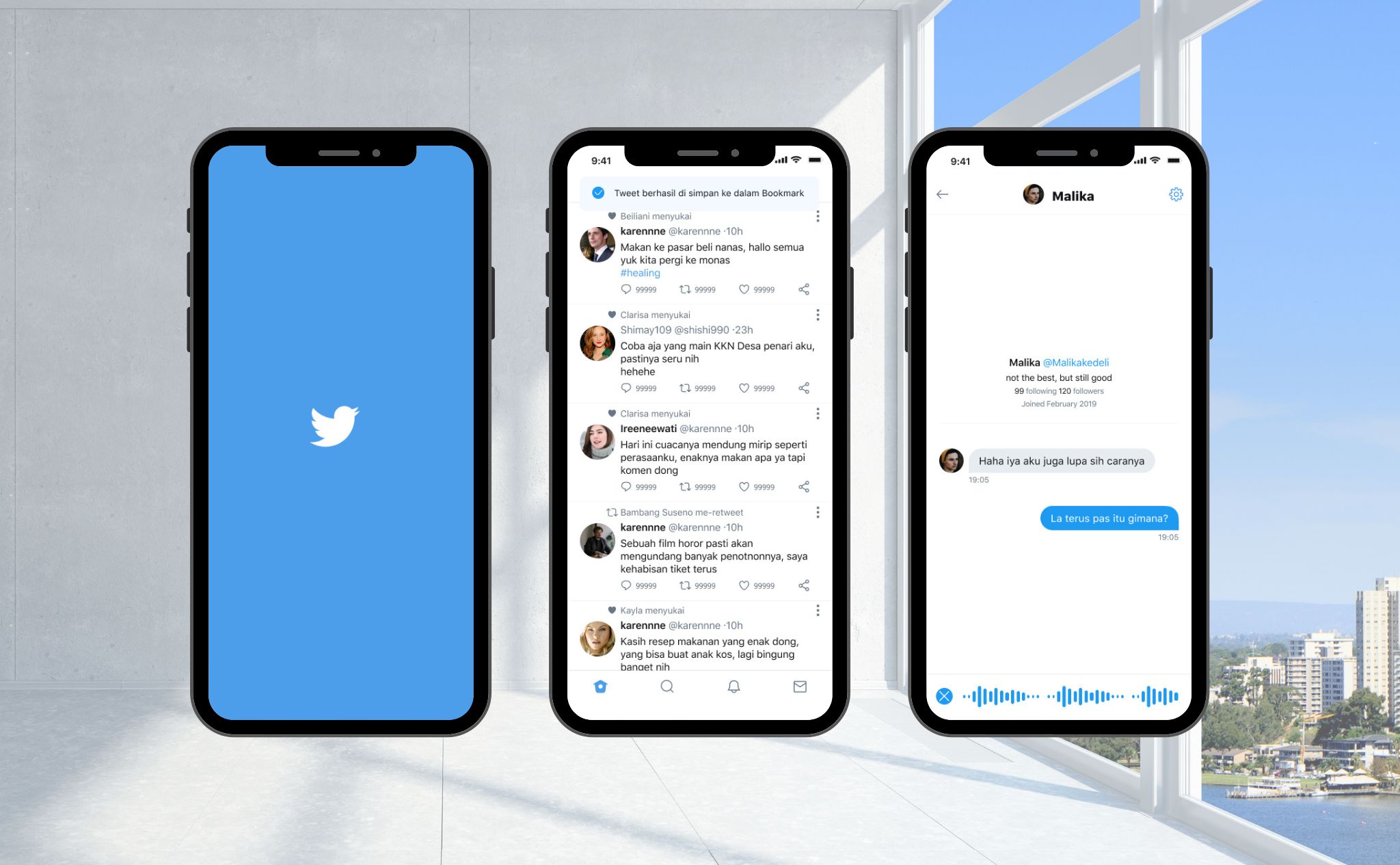
The results of the High Fidelity design of the Twitter application will be displayed.
Hi-Fi Direct Message 💌
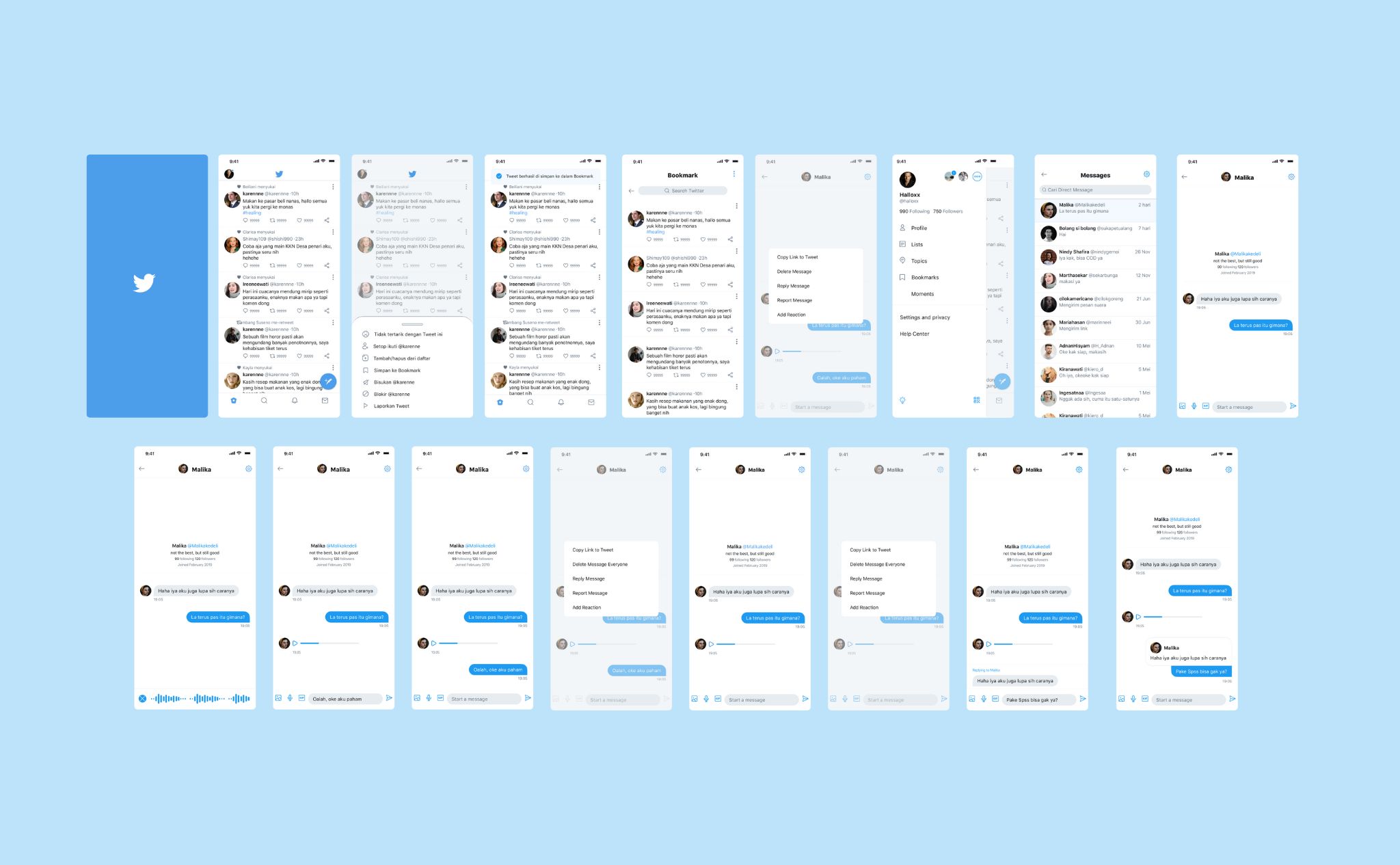
Some of the latest features are added in the final design of Direct Messages. Features to send voice messages (voice notes), cancel messages (un-send chat), and reply messages.
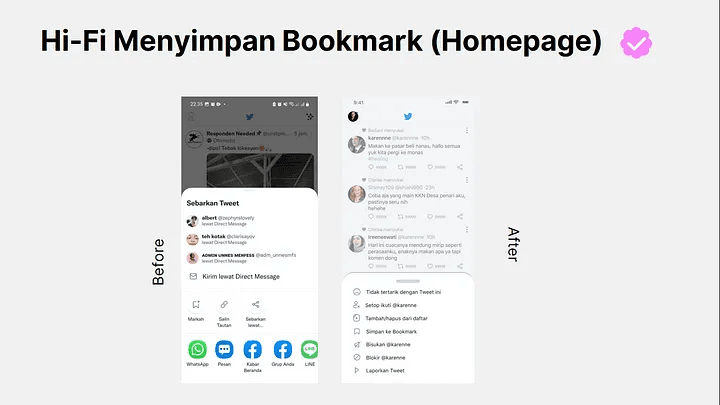
Hi-Fi Save Bookmark
I move the menu to save bookmarks originally in the bottom share when saving bookmarks. I move them into the bottom menu point three. It makes it easier for users if they want to save tweets into bookmarks.
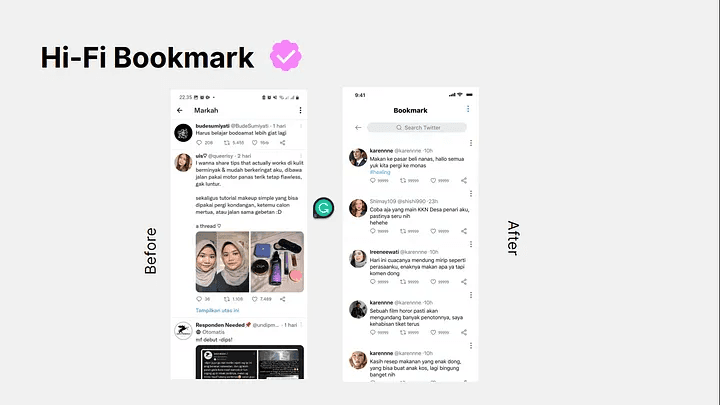
Hi-Fi Bookmark
When saving tweets into bookmarks, I add a search field on this page (page bookmark). It is to make it easier for users if they want to search for tweets that have been saved without having to scroll one by one.
Testing 📢
Yash! It’s time for me to retry the design that I have made with the features I added. Testing in the 2nd iteration is useful to judge whether my design has helped users or not.
To validate my application, I surveyed five people with my prototype. I assigned some tasks around the prototype I had created by doing the same task in the first iteration.
and this is the result
Key Insight
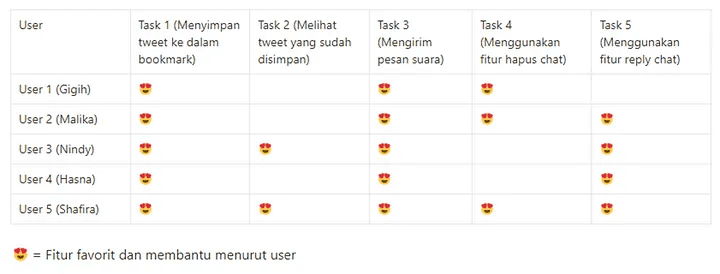
All users managed to perform the task created smoothly without any significant obstacles. The user gives a positive response to the design made and its features. However, they still need adjustment and habituation to operate this feature. Some users are still confused and misunderstand the copy, so this needs to be fixed again. Here is a feature evaluation table where this table shows which features are very helpful and liked by users
Product Success & Conclusion, Feedback 🥇
Product Sucess
In this application, my product success is in adding a reply feature and deleting messages because it feels helpful for users.
Conclusion and Feedback 🙆♀️
After usability testing, I got new insights from users, such as copying the delete message feature should be changed to “delete message for everyone” or “delete message” for everything because users tend to be confused when deleting messages. Overall, user feedback is very good.